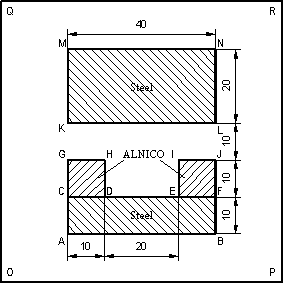
The tutorial example C-Shaped Magnet is based on the Magn1 example described in the Examples chapter of the QuickField User's Manual. It might be useful to browse through the Tutorial chapter of the QuickField online help you have not seen it before.
The model consists of a permanent magnet and a steel keeper in the air. The permanent magnets are made of ALNICO. The polarizations of the magnets are along vertical axis opposite to each other.
All dimensions are in centimeters.
Our task is to measure the force acting on the steel keeper versus the distance between the keeper and the magnet. We might also want to explore how the level of coercive force of ALNICO magnet affects on the mechanical force.
We will discuss two different ways of solving this problem.
Lesson 1: Using the existing problem. First we use an existing problem and write a very simple application in Visual Basic (or Visual Basic for
Application) that performs multiple calculations of the mechanical force. Here you learn how to start a new VB or VBA project, create a QuickField session, open and modify an existing problem, model and data documents, solve the problem, analyze result and evaluate local and integral field
quantity.
Also you can find code written on following languages:
Lesson 2: Creating a new problem. On the next step we create a new problem, geometric model and physical properties from scratch. Here you learn how create a new QuickField problem, build geometric model and create physical data.